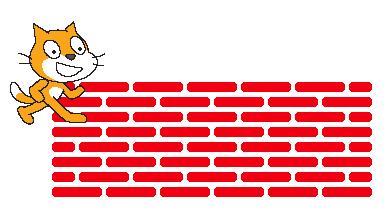
Sometimes, when we write programs and scripts, it feels like we have hit a brick wall! (This is a good sign - it is supposed to be hard.) For homework, you are going to draw this brick wall.
Exercises and Hints
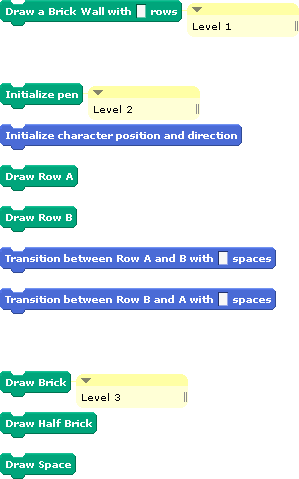
This homework is not just about drawing; it is also about practicing abstraction. You will draw the following brick wall by implementing the blocks listed below.
Note: You must implement these blocks and adhere to the abstraction described below.
There are two kinds of rows in this brick wall:
-
Row A:

-
Row B:

The big idea is that there are three levels of abstraction.
At the lowest level of abstraction (Level 3):
-
You need to figure out how to draw individual bricks, small bricks and spaces.
-
This level of abstraction contains the following blocks:
-
The
Draw Brick block, which draws a single brick. (Hint: a brick is drawn by setting the pen size to about 10)
-
The
Draw Small Brick block, which draws the small brick for the edges of row B. Note that this brick will not be exactly half as long as the full brick. Part of this homework is figuring out how long the "small brick" should be.
-
The
Draw Space block, which draws a space between each brick or small brick.
At the middle level of abstraction (Level 2):
-
You can use the functionality provided by the bottom level of abstraction to make entire rows of bricks.
-
The rows referred to as "Row A" and "Row B" should look like the rows shown above.
-
This level of abstraction contains the following blocks:
-
The
Initialize Pen block, which should initialize the pen color and size.
-
The
Initialize Character Position and Direction block, which should initialize the position and direction of the character.
-
The
Draw Row A block, which should draw a single copy of Row A.
-
The
Draw Row B block, which should draw a single copy of Row B.
-
The
Transition between Row A and B with __ space block, which should transition between the end of Row A and the beginning of Row B, leaving a space as wide as the number of pixels specified by the input argument.
-
The
Transition between Row B and A with __ space block, which should transition between the end of Row B and the beginning of Row A, leaving a space as wide as the number of pixels specified by the input argument.
At the highest level of abstraction (level 1)
-
You will put together the full brick wall using only the functionality provided by the middle level of abstraction.
-
This level of abstraction contains only the
Draw a Brick Wall with __ rows block, which draws a brick wall with the specified number of rows.
In summary, you should implement the following blocks:
Note: Whenever you need to refer to a fixed number, such as the width of a brick, use a global variable. This is generally considered good style, because you can use the same variable in multiple places in your program, and you only need to change the value of the variable to change it in multiple places at once, to tune up the appearance of your wall.
Upload and Submit
Once you are done, upload your solution as a file called Brick-Wall and submit.