Lab 1: Games

from Lab 1, Page 1
What would this look like in Python?
secretNumber = 7
(Python uses one equals sign to set the value of a variable.)
AAP-1.B.2
set (secret number) to (7) would be written as
secretNumber ← 7
or a white rounded rectangle containing the text 'secretNumber ← 7'.
from Lab 1, Page 2
The code ask (Why did the chicken cross the road?) and wait; set (user response) to (answer) would be written as
DISPLAY("Why did the chicken cross the road?")
userResponse ← INPUT()
or a white rounded rectangle containing two smaller white rounded rectangles: The first one contains first the word 'DISPLAY' in all caps and then a smaller white rectangle containing the quoted text 'Why did the chicken cross the road?'. The second one contains the text 'userResponse ← INPUT()'.
AAP-3.A.8, AAP-3.A.9
Notice that the procedure
INPUT()
accepts the value from the user and returns that input value, which is then assigned to the variable
userResponse
with the
syntax. In Snap!, this is just like how answer accepts a value from the user and reports it, and that report is what the computer sets the variable user response to.
What would this look like in Python?

input = prompt("Why did the chicken cross the road?")
userResponse = input
from Lab 1, Page 4
change (score) by (1) (which means set(score) to (score+1)) would be written as
score ← score + 1
or score ← score + 1.
from Lab 1, Page 5
AAP-2.N.1 bullet 1
The list expression item (2) of (costumes) would be written as
costumes[2]
or costumes[2]. All three versions of this code would report/return the penguin costume (if only the AP language had costumes as a data type):
item (2) of (costumes) reporting a picture of the penguin costume
from Lab 1, Page 5
AAP-2.N.1 bullet 7
The expression length of (words list) would be written as
LENGTH(wordsList)
or LENGTH(wordsList).

Lab 2: Making Lists

from Lab 2, Page 1
AAP-1.C.1 second sentence, AAP-1.D.7
What would this look like in Python?
["Señora", "Ms. C", "my cat", "Hannah", "Jake"]
The list expression list{Señora, Ms. C, my cat, Hannah, Jake} would be written as
[Señora, Ms. C, my cat, Hannah, Jake]
. The items are positioned in the list in the order they appear in the text: "Señora" has index 1, "Ms. C" has index 2, and so on.
from Lab 2, Page 1
AAP-1.D.7 bullet 2
The assignment instruction set (shopping list) to (list) would be written as

shoppingList ← []
or shoppingList ← [].
AAP-1.D.7 bullet 1
What would this look like in Python?
shoppingList = ["apples", "bread", "carrots", "rice", "pasta"]
The assignment instruction set (shopping list) to {apples, bread, carrots, rice, pasta} would be written as
shoppingList ← [apples, bread, carrots, rice, pasta]
or shoppingList ← [apples, bread, carrots, rice, pasta]. (In this app, you'll want the shopping list to begin empty, and then the user will add or insert additional grocery items one at a time.)
from Lab 2, Page 1
AAP-2.N.1 bullet 4
What would this look like in Python?
shoppingList.insert(1, "tomatoes")
(In Python, the first item of a list is item number 0, so the second item is in position 1.)
insert (tomatoes) at (2) of (shopping list) would be written as
INSERT(shoppingList, 2, "tomatoes")
or INSERT(shoppingList, 2, 'tomatoes'). See an example.
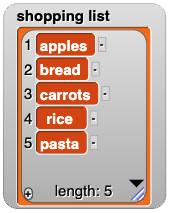
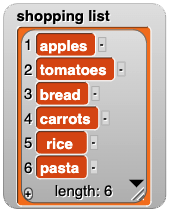
{"apples", "bread", "carrots", "rice", "pasta"} {"apples", "tomatoes", "bread", "carrots", "rice", "pasta"}
AAP-2.N.1 bullet 5
What would this look like in Python?
shoppingList.append("tomatoes")
add (tomatoes) to (shopping list) would be written as
APPEND(shoppingList, "tomatoes")
or APPEND(shoppingList, 'tomatoes').

See an example.

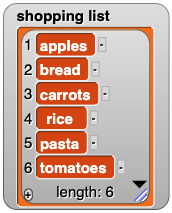
{"apples", "bread", "carrots", "rice", "pasta"} {"apples", "bread", "carrots", "rice", "pasta", "tomatoes"}
from Lab 2, Page 1
AAP-2.N.1 bullet 6
delete item (2) of (shopping list) would be written as
REMOVE(shoppingList, 2)
or REMOVE(shoppingList, 2).
from Lab 2, Page 1
The items in a list are values, so you can use item of anywhere you can use any other expression. For example:
AAP-2.N.1 bullets 2 and 3
from Lab 2, Page 1

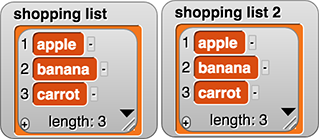
When you run this script in Snap!, the second line of code assigns to shopping list 2 the value of shopping list (that is, the same list, not a copy). So, the third line of code modifies both variables:
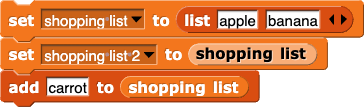
set(shopping list) to (list(apple)(banana))
set(shopping list 2) to (shopping list)
add (carrot) to (shopping list) shopping list watcher showing the contents of the variable to be apple, banana, carrot; and the shopping list 2 watcher showing the contents of the variable to be apple, banana, carrot

AAP-1.D.7 bullet 3, AAP-2.N.2
However on the exam, the statement
shoppingList2 ← shoppingList
makes a copy of the list. So modifying one of them does not modify the other.

The rules for how to use lists and how they behave differ depending on the programming language you are using.

What would this look like in Python?

shoppingList1 = ["apple", "banana"]
shoppingList2 = shoppingList1
shoppingList1.append("carrot")
					
from Lab 2, Page 3
AAP-2.O.3
The procedure
goto()
isn't built in to the AP's language so it is written in lower case like other programmer-defined procedures.
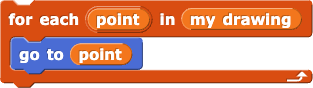
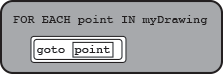
The script for each (point) of (my drawing) (go to (point)) would be written as
FOR EACH point IN myDrawing
{
    goto(point)
}
or FOR EACH point IN myDrawing
{
    goto(point)
}.
Should we discuss that the goto procedure had to have been defined (as we do with the college board stuff just above and to the right?? --MF, 2/20/25
What would this look like in Python?

for each point in myDrawing:
    goto(point)
					

Lab 3: Making Decisions

from Lab 3, Page 1
AAP-2.E.2
You may see these five relational operators:
=, >, <, ≥, ≤
as well as a sixth:
, which means "not-equal" and reports false if the two inputs are equal and otherwise reports true (if they are not equal). When you write the () not equal () block, it will work like this:
(3) not equal (4) reporting true (3) not equal (3) reporting false

These six relational operators all report a Boolean value (true or false).

from Lab 3, Page 2
AAP-2.F.1
The () and (), () or (), and not () blocks will appear as
AND
,
OR
, and
NOT
and will work exactly the same way as they do in Snap!.

Lab 4: Making Computers Do Math

from Lab 4, Page 1
Different programming languages have different ways of handling negative inputs to the mod function. So you won't see any negative numbers used with mod on the exam.
The mod operator: The expression (17) mod (5) would be written as

17 MOD 5
on the exam. If you see an expression with variables as input to mod, such as
a MOD b
, you can assume that a is zero or positive, and b is strictly positive (because you can't divide by 0).
AAP-2.B.5, AAP-2.C.1, AAP-2.C.2, AAP-2.C.3, AAP-2.C.4
On the exam, you may see these four arithmetic operators:
+
,
-
,
*
,
/
(plus, minus, times, divide) as well as
MOD
. Arithmetic operators are part of most programming languages. (Most text languages use
*
rather than
×
for multiplication because
×
isn't on most keyboards, and because it looks too much like the letter x.)
What would this look like in Python?
17 mod 5
AAP-2.L.2
Order of operations: In a block language, the nesting of blocks determines the order of operations. For example, in 3 × (5 + 4) you can see that the + block is an input to the × block, so the expression means 3×(5+4). Similarly, (3 × 5) + 4 means (3×5)+4. In Snap!, it's as if there are parentheses around every operation. But in text languages, you can write
3 * 4 + 5
without parentheses, so they need the rules you learn in math class (multiplication before addition, and so on). The mod operator is like multiplication and division; it happens before addition and subtraction. So for example,
7 + 5 MOD 2 - 6
means
7 + 1 - 6
, which is, of course, 2.
What would this look like in Python?

3 * (5 + 4)
(3 * 5) + 4
					
from Lab 4, Page 1
AAP-2.H.2
The procedures
move()
and
turn_clockwise()
aren't built in to the AP's language so they are written in lower case like other programmer-defined procedures.
The conditional expression if (size > 15) {repeat (4) {move (size) steps, turn clockwise (90) degrees}} would be written as
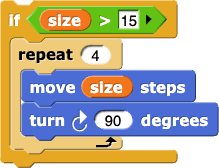
IF(size > 15)
{
    REPEAT 4 TIMES
    {
        move(size)
        turn_clockwise(90)
    }
}
or IF(size > 15)
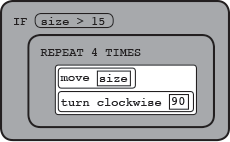
{
    REPEAT 4 TIMES
    {
        move(size)
        turn clockwise(90)
    }
}

As in Snap!, if the condition (size) > 15 is true, the code inside the if statement runs; if the condition is false, the code does not run.

What would this look like in Python?

if size > 15:
    for i in range(0, 4):
        move(size)
        turn_clockwise(90)
					
from Lab 4, Page 3
AAP-3.C.2
You saw the procedure definition for a command in Unit 1 Lab 3 Page 4: Modify Your Pinwheel.
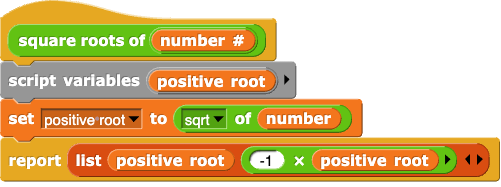
The definition for a reporter looks much like the definition for a command except that it includes a
RETURN
(like report). For example, this definition

In many languages (including Snap!) variables must be declared in some way (in Snap!, you can click the "Make a variable" button or use the script variables block). But the AP's language doesn't include variable declarations, so you won't see them on the exam.

square roots of (number) {script variables (positive root), set (positive root) to ((sqrt) of (number))), report (list (positive root) ((-1) × positive root))
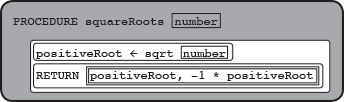
would be written as
PROCEDURE squareRoots(number)
{
    positiveRoot ← sqrt(number)
    RETURN([positiveRoot, -1 * positiveRoot])
}
or square roots of (number) {script variables (positive root), set (positive root) to ((sqrt) of (number))), report (list (positive root) (() - positive root))
AAP-3.A.7
As with report in Snap!, when a
RETURN
statement is executed, the flow of control returns to the place in your code where the procedure was called, and the procedure returns the value of the expression inside the
RETURN
command or report block.
Also, the procedure
sqrt
isn't built in to the AP's language so it is written in lower case like other programmer-defined procedures.
What would this look like in Python?

def squareRoots(number):
    positiveRoot = sqrt(number)
    report [positiveRoot, -1 * positiveRoot]
					
(Note that in Python, there's nothing like the script variables block. The first time you set a variable, it is automatically created.)
from Lab 4, Page 3
AAP-2.H.3
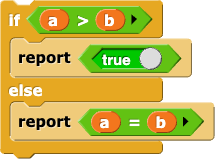
The conditional expression if (a > b) {
    report true
} else {
    report (a = b)
} would be written as
IF(a > b)
{
    RETURN(true)
}
ELSE
{
    RETURN(a = b)
}
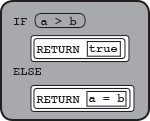
or IF(a > b)
{
    RETURN(true)
}
ELSE
{
    RETURN(a = b)
}
As in Snap!, if the condition
a > b
is true, the code in first block of statements runs; if it is false, the code in second block of statements runs.
What would this look like in Python?

if a > b:
    report True
else:
    report a == b
						
(Notice that Python uses two equals signs to check for equality.)