Lab 1: Games

from Lab 1, Page 1
Examples like this one are useful to test your understanding of assignment to variables, but you wouldn't use a sequence of assignments like this in an actual program.
What value will this code display?
a ← 3
b ← a
a ← 4
DISPLAY(b)
3
4
a
b
from Lab 1, Page 1
What value will this script report?
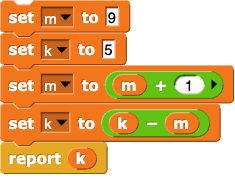
set m to 9, set k to 5, set m to (m + 1), set k to (k - m), report k
-5
3
-4
5
from Lab 1, Page 2
We really shouldn't be encouraging students to mutate a block's inputs. There are really two issues here; one is with the x=x+1 style of programming altogether, and the second is that formal parameters specifically shouldn't generally be mutated; it's better to make a script variable that's initialized to the input value. (If we change this, we need to update the Guided Notes.) --MF, 6/26/21 with BH
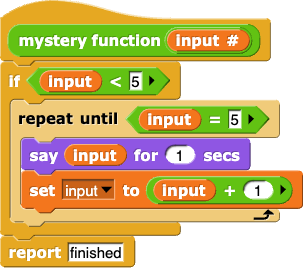
mystery function (input):
if (input < 5) (repeat until (input = 5)
(
    say (input) for (1) secs,
    set (input) to (input + 1)
)
report (finished) Which inputs to mystery function will report "finished"?
Any integer
Only integers greater than or equal to 5
Only integers less than 5
Only 5
from Lab 1, Page 2
mystery function (input):
if (input < 5) (repeat until (input = 5)
(
    say (input) for (1) secs,
    set (input) to (input + 1)
)
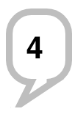
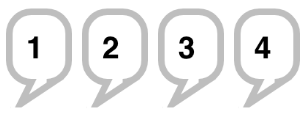
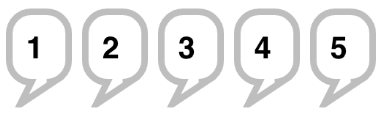
report (finished) What will the sprite say if you run the same function with the input 1?
speech bubble saying '4'
speech bubble saying '5'
four speech bubbles saying '1', '2', '3', and then '4'
five speech bubbles saying '1', '2', '3', '4', and then '5'
The feedback is not finished because I realized that BH might object to changing the value of an input variable... --MF, 3/1/19
from Lab 1, Page 2
mystery function (input):
if (input < 5) (repeat until (input = 5)
(
    say (input) for (1) secs,
    set (input) to (input + 1)
)
report (finished) What will happen if you run the same function with the input 9?
The sprite will say 9, and the block will report "finished."
The sprite will say 9, 8, 7, 6, and the block will report "finished."
The sprite will say 9, 10, 11, 12, 13, … and keep counting, and the block will never report "finished."
The sprite will say nothing, and the block will report "finished."
The feedback is not finished because I realized that BH might object to changing the value of an input variable... --MF, 3/1/19
from Lab 1, Page 5

AAP-2.N part b
Which of the following blocks will report a list of length 3?

Choose all that apply.
list (pineapple strawberry kiwi)
item 3 of {pineapple, strawberry, kiwi}
item 2 of {lemon, {pineapple, strawberry, kiwi}}
list () (pineapple) ()

Lab 2: Making Lists

from Lab 2, Page 2

Imagine you make a variable capitals and use set to give this list of lists a name:
set (capitals) to {{Augusta, Maine}, {Boise, Idaho}, {Columbia, South Carolina}, {Des Moines, Iowa}}
Which of the following statements are true?

Choose all that apply.

item (1) of (capitals) reports a list with two items: "Augusta" and "Maine".

item (1) of (item (1) of (capitals)) reports the word "Augusta".
item (last) of (item (2) of (capitals)) reports the word "Iowa".
(length) of (capitals) reports the number 8.
all but first of (item (last) of (capitals)) reports a list with one item: "Iowa".
item (3) of (capitals) reports the string "Boise".
item (last) of (all but first of (capitals)) reports the string "Iowa".
(length) of (item (1) of (capitals)) reports the number 2.
from Lab 2, Page 3

Which of the scripts below will produce the following sprite behavior?
sprite saying Abraham then Lincoln
(When you run the script, though, it actually says Abraham Lincoln only once.)

Choose all that apply.

for each (item) of {Abraham, Lincoln} [say (item) for (1) secs]
say {Abraham, Lincoln} for (2) secs
say (item (1) of {Abraham Lincoln, George Washington, Barack Obama}) for (2) secs
say (item (1) of {Abraham, George, Barack} for (1) secs, then say (item (1) of {Lincoln, Washington, Obama} for (1) secs
from Lab 2, Page 3
AAP-2.O part b
inputList ← [3, -1, 2, 10, -5]

FOR EACH item IN inputList
{
  IF(item > 0  AND  item * item > 4)
  {
    DISPLAY(item)
  }
}

What will be displayed as a result of running the code segment given?
9, 1, 4, 100, 25
9, 100
3, 2, 10
3, 10
from Lab 2, Page 3
PROCEDURE Mystery(numberList, targetNumber)
{
  counter ← 0
  FOR EACH number IN numberList
  {
    IF(number > targetNumber)
    {
      counter ← counter + 1
    }
  }
  RETURN(counter)
}
myMathGrades ← [100, 80, 90, 80, 60, 100, 50, 100]
Mystery(myMathGrades, 60)

What will be returned if the code above is run?
[100, 80, 90, 80, 100, 100]
7
6
60

Lab 3: Making Decisions

from Lab 3, Page 1
AAP-2.E.4B
Consider the following code segment.
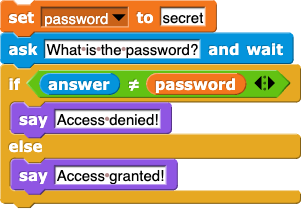
set (password) to (secret); ask (What is the password?) and wait; if (answer) ≠ (password) {say (Access denied!)} else {say (Access granted!)}
If a user enters "password123," what will be the output?
Access granted!
Access denied!
No output; there will be an error message.
No output; the code does not provide an output for this situation.
from Lab 3, Page 1
AAP-2.L.1D
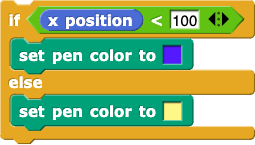
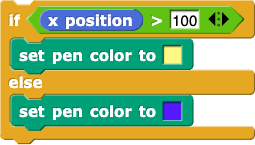
Do the following code segments produce the same outcome?
if (xposition) < (100) {set pen color to (blue)} else {set pen color to (yellow)} if (xposition) > (100) {set pen color to (yellow)} else {set pen color to (blue)}
No, wherever one code segment sets the pen color to blue, the other sets the pen color to yellow (and vice versa).
No, they have different outcomes when the x position of the sprite is 100.
Yes, the outcome for both segments is no change; the pen color will never change.
Yes, wherever one code segment sets the pen color to blue, the other does too (and likewise for yellow).
from Lab 3, Page 2
There's no built in ≤ block in Snap!. Suppose we wanted to build one. Which two of the following Boolean expressions are equivalent to the expression num less than or equal to 23 predicate?
(num < 23) and (num = 23)
(num < 23) or (num = 23)
not (num > 23)
not (num > 22)
from Lab 3, Page 2
Which of the following expressions will report true?
  1. (T and F) and (not (T and F))
  2. (not (T or F)) or (T or F)
I only
II only
I and II
Neither I nor II
from Lab 3, Page 3
AAP-2.I.4.B
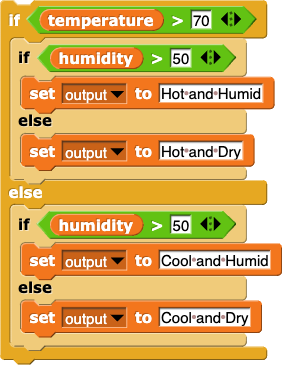
You are working on a weather application that categorizes outdoor conditions based on temperature (in Fahrenheit) and humidity (as a percentage). The following code is used to determine whether it is "Hot and Humid," "Hot and Dry," "Cool and Humid," or "Cool and Dry."
if (temperature > 70) { if (humidity > 50) {set output to Hot and Humid} else {set output to Hot and Dry}} else { if (humdidity > 50) {set output to Cool and Humid} else {set output to Cool and Dry}}
Suppose your app's sensors detect a temperature of 60°F and a humidity of 40%. What will be the program output?
Hot and Humid
Hot and Dry
Cool and Humid
Cool and Dry
from Lab 3, Page 5
AAP-2.E
What would you put into the gray ring to find all the items in the list that start with the letter “a”?
keep items ([gray ring]) from (list(apple, banana, orange, grape))
letter (1) of (a)
(letter (1) of ()) = a
(item (1) of ()) = a
(letter (1) of (list(empty)) = a
from Lab 3, Page 5
AAP-2.E
Which of the following items, if in mystery list, would be in the list reported by this block? Choose all that apply.
keep items (not(is () a number?) and (length of text() > 10)) from (mystery list)
A number with more than 10 digits.
A number with fewer than 10 digits.
A mix of numbers and letters that is more than 10 characters long.
A five-word sentence made of words that are each 2 or 3 letters long.
A phrase that is less than 10 characters long.
Any phrase that does not contain any numbers.
A 16-character password with numbers, letters, and symbols.
A long word with more than 10 letters, like "comprehensible."

Lab 4: Making Computers Do Math

from Lab 4, Page 1
AAP-2.L.2
Algorithms that look the same may have different results. The following incomplete code fragment was designed to test if
number
is odd:
IF (MISSING CONDITION)
{
  DISPLAY "It is odd."
}

Which of the following can be used in place of the MISSING CONDITION?
number MOD 1 = 0
number MOD 1 = 1
number MOD 2 = 0
number MOD 2 = 1
from Lab 4, Page 1
What's the value of 11 mod (2 + 3)?
1
0.2
2
2.2
from Lab 4, Page 3

When will "Error. Invalid entry." be displayed?

PROCEDURE greaterThanOrEqualTo(a, b)
    IF(a > b)
    {
        RETURN(true)
    }
    ELSE
    {
        RETURN(a = b)
    }
    DISPLAY("Error. Invalid entry.")
}
When
a > b
is true.
When
a > b
is false.
Always
Never

Lab 5: Copyrights

from Lab 5, Page 1
IOC-1.F.2
Which of the following best describes a situation where intellectual property (IP) laws are violated?
Downloading a free application from the developer's website.
Sharing a movie file you purchased through a file-sharing service.
Purchasing a song from an online music store.
Creating a backup copy of software you legally own.
from Lab 5, Page 2
IOC-1.F.5
Which statement incorrectly contrasts open access and open source?
Open access refers to online research output that is free of restrictions on access, while open source refers to software for which people can inspect the code.
Open source makes code available which may allow users to see how their data are being used, while open access refers to freely available research publications and data.
Open access applies to creative works, while open source applies to academic research.
Open access is always free to read, while open source may have licensing terms that allow redistribution but restrict commercial use.
from Lab 5, Page 4
IOC-1.F.11
Imagine a new app called "StreamShare" has been developed, allowing users to download and share any digital media files, such as movies, music, and e-books. While the app is popular, critics have raised concerns about its impact on content creators and publishers. Which of the following is most likely the basis of their concern associated with apps like "StreamShare"?
The app may increase Internet traffic and the demand on Internet service providers.
The potential for copyright infringement.
This popular app may compete with their file-sharing apps.
This app may encourage sharing of inappropriate media content.