 ),
data management
(
),
data management
( and
and  ),
and computation
(
),
and computation
( and
a few
and
a few  blocks)
have direct equivalents in most languages.
blocks)
have direct equivalents in most languages.
On this page, you will learn about similarities between Snap! and other common sequential languages.
Central programming language features having to do with flow of control
(),
data management
(
and ),
and computation
( and
a few blocks)
have direct equivalents in most languages.
| Snap! | Python | JavaScript |
|---|---|---|
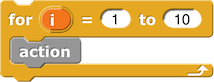 |
for i in range (1, 11):
action() |
for (i=1; i <= 10; i++) {
            action()
} |
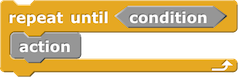 |
while (not condition):
action() |
while (not condition) {
            action()
} |
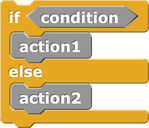 |
if condition:
            action1()
        else:
action2() |
if (condition) {
            action1()
        } else {
            action2()
} |
 |
yes if condition else no |
(condition ? yes : no) |
 |
return value |
return value |
 |
return |
return |
 |
lambda x : some_function(x) |
function (x) {
            return someFunction(x)
        }
or
(x) => someFunction(x) |
 |
a * b |
a * b |
 |
a ** b |
a ** b |
 |
a and b |
a && b |
 |
" ".join(["hello","world"])or "hello " + "world" |
"hello".concat(" ","world") or "hello " + "world" |
 |
foo = 87 |
foo = 87 |
 |
foo += 5 |
foo += 5 |
 |
["John", "Paul", "George", "Ringo"] |
["John", "Paul", "George", "Ringo"] |
 |
value[0] |
value[0] |
 |
value[1:] |
value.slice(1) |
 |
list(map(some_function, value))or [some_function(x) for x in value] |
value.map(someFunction) |
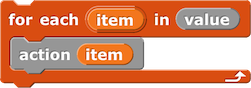 |
for item in value:
action(item) |
value.forEach(action) |
This is just a small sample of the number of primitive commands and functions in any programming language. Luckily, you don't have to memorize them; you can do a web search for "javascript list item," for example, to learn any particular one as you need it.
By the way, look at the Python join in the table.
It has the very nice feature of allowing you to choose a separator
to go between the joined strings:
>>> " ".join(["John", "Paul", "George", "Ringo"])
'John Paul George Ringo'
>>> ",".join(["John", "Paul", "George", "Ringo"])
'John,Paul,George,Ringo'
In the first interaction, the string " " provides
the separator; in the second, the string "," does.
That's an elegant way to extend the idea of joining strings,
avoiding the need to put spaces in the input strings.
(You could also use an empty string to get the exact effect of
the join block in Snap!.)
map.
Why do you have to wrap a list(...)
around the call to map? It's because Guido van
Rossum, the designer of Python, hates higher order functions,
so when his users insisted on having them, he made it as
painful as possible to use them. Python's map
doesn't return a list; it returns this strange other thing that
you have to convert to a list. (He wants you to use
the for x in notation instead.) Similarly, he
hates anonymous procedures (Snap! gray rings), and
so when his users insisted, he grudgingly allowed
anonymous reporters that fit on one line,
but not longer reporters or any anonymous command scripts.
Python could be a really usable language if he didn't have
his head wedged on these issues.
But look at the Python equivalent of for. Why
does range(1,11) mean "the numbers from 1 to 10"?
The idea is that you're using those numbers to select items
from a list, but instead of numbering the items, Python numbers
the spaces between items, just as when you're using a
word processor it displays the cursor as a vertical line
between two letters. So range(1,11) means "the
items to the right of gap number 1 and to the left of gap
number 11." You can learn to think that way, but it's not
obvious to a beginner. (It's a little more intuitive if you
start at position 0, before the beginning of the list;
range(0,5) selects five items
from a list, and you can abbreviate it as range(5).)
What do you think about using + to join strings?
It's meant as an analogy with arithmetic; you are "adding" one
string to another. Using the same symbol to mean two different
things in different contexts is called "overloading." It's not
too bad in Python, which is very strict about the distinction
between a number and a string of digits. (2+"3"
gives an error message.) But JavaScript, like
Snap!, will automatically convert a number into a
string of digits if necessary, so 2+"3" is "23"
even though 2+3 is 5. (The automatic conversion
isn't a problem in Snap! because Snap!
doesn't overload the + operator.)
The other block categories, the ones having to do with graphics
or sound, don't really have analogs in other languages. Instead,
just as Snap! has libraries, other languages also have
libraries to provide such capabilities. For example, if you want
JavaScript equivalents to the turtle graphics blocks
(move (n) steps, etc.), you start in your search
engine; "JavaScript turtle graphics" will get you to
https://github.com/bjpop/js-turtle
from which you can download the file "turtle.js" to include with
your own JavaScript program. (On the other hand, because
the main purpose of JavaScript is writing programs that will be
run inside a browser window, it does have built-in support for
the sort of graphics you see in typical browser windows:
scrolling text boxes, form-filling, checkboxes, etc.)
Libraries are a little easier in Python because there's a central repository of them. So you can draw a square this way:
from turtle import *

pendown()
for i in range (4):
    forward(100)
    right(90)
The kids who could learn programing without us "know how to learn stuff." I'm not convinced that it has to be W3, but I think it would be lovely to (and perhaps even a shame not to) end this page with some "next steps" for kids to explore on their own time. --MF, 12/20/21