In this lab, you will learn about other programming languages and how you can learn them by building on your skills with Snap! programming.
On this page, you will learn about sequential programming languages and see that you can already kind of read them.
A programming language is characterized by two things: a philosophy of programming and details of notation. Most modern programming languages are multi-paradigm but basically sequential. This includes Snap!, even though you have learned some composition (nesting) of functions (known as functional programming) and some ideas about sprites as objects (object-oriented programming).
Multi-paradigm languages take ideas from several different approaches to programming style. Here are a few approaches you have seen in Snap!:
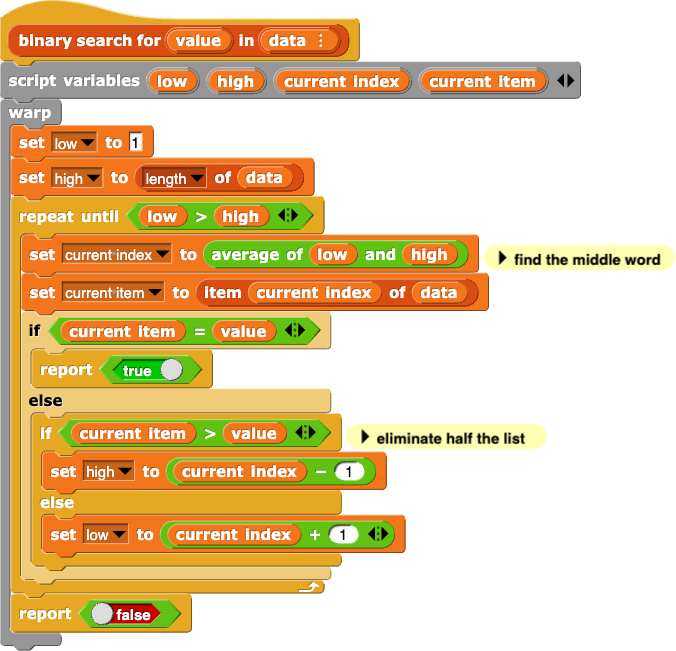
Learning another language of the same type is much easier than learning your first one. For example, here’s the binary search function from Lab 1 of this unit:
 Review the Snap! binary search algorithm shown above, and discuss how it works so that you can compare it with the same algorithm written in other languages.
Here's the same procedure written in Python:
def binary_search(value, data):
    low = 0
    high = len(data)-1
    while (low <= high):
        current_index = average(low, high)    # find the middle word
        current_item = data[current_index]
        if (current_item == value):
            return True
        elif (current_item > value):          # eliminate half the list
            high = current_index-1
        else:
            low = current_index+1
    return False
Read the Python version of the binary search function and compare it to the Snap! code. Discuss the similarities and differences.
returninstead of
 . There are also several more significant differences in notation.
 script variables block. Variables are automatically local (usable only within their procedures) and will only be global (usable anywhere in the program) if you use a globalor
nonlocalstatement. Why does Python do this?
script variables block and local variables on Unit 2 Lab 1 Page 1: Starting a Number Guessing Game.)
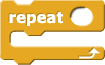 Python uses indentation to organize code structure. Snap! uses C-shaped blocks (like the
 repeat block shown right) to control which instructions are part of a loop or conditional; Python uses indentation instead. See a comparison.
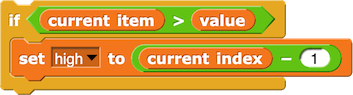
if (current_item > value):
    high = current_index-1
The vertical left edge of Snap!'s C-shaped block is visually similar to the indentation, but Python doesn't have a visual equivalent to the bottom edge of the C-shaped block; you know the extent of the loop or conditional has ended only because the indentation of the text decreases. Python is unique among popular languages in making the amount of spacing significant in this way.
array[n]is array+n. This slightly simplifies the translation of a program to machine language, at the cost of confusing the human programmer, who has to stop and think about whether the 23rd item of an array is
array[22]or
array[24]. Abstracting away the question of how lists are stored in memory, we think the 23rd item should be
item 23 ofthe list to match the expectation of the human programmer.
 could be written as
 3*4+5because of order of operations.
 would need to be written as
 3*(4+5)in Python.
 . Instead, Python programmers often use underscore characters ( _ ) inside variable names (such as in
 current_item).
x = 3instead of
 .
.x == 3instead of
 .
.x = x+1instead of
 or
or 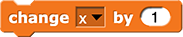 .
.
Why does Python use = like this?
This design choice is inherited indirectly from Fortran, a programming language invented back in the 1950s when computers could display only 64 different characters, so there were fewer options available.
=for assigning to a variable, you can train yourself to pronounce
=as "gets" or "becomes" as in "x gets 3" or "x becomes 3" rather than as "x equals 3." But you should still pronounce
==as "equal equal," so you never say a single "equals" by itself, which would be ambiguous.
GossipMod OperatorHere's the same binary search procedure written in JavaScript:
function binarySearch(value, data) {
    var low, high, currentIndex, currentItem;
    low = 0;
    high = len(data)-1;
    while (low <= high) {
        currentIndex = average(low, high);    // find the middle word
        currentItem = data[currentIndex];
        if (currentItem == value) {
            return true;
        } else if (currentItem > value) {     // eliminate half the list
            high = currentIndex-1;
        } else {
            low = currentIndex+1;
        }
    }
    return false;
}
This doesn't look so different from the Python version, but there are a few significant differences.
 Read the JavaScript version of the binary search function can compare it to the Python code and the Snap! code. Discuss the similarities and differences.
varstatement is equivalent to
.png "script variables (a)") . There are better ways to create local variables in JavaScript, but they look different from Snap!.
. There are better ways to create local variables in JavaScript, but they look different from Snap!.{ }
mark the extent of what would be a C-shaped block in Snap!. (Although JavaScript programmers do generally indent code more or less the same way Python programmers do, in JavaScript the indenting doesn't matter to the computer but is just to make it more readable to people.)
I cut all of this because it's confusing. There are semicolons at the end of every line above. --MF 9/2/25
Within the braces, statements are separated by semicolons (;). (In JavaScript, semicolons go between statements:
{statement; statement; statement}, but in the C programming language, which is otherwise quite similar, the semicolons go after statements: {statement; statement; statement;}.
CUT FROM BEFORE:
This is the sort of thing that drives students of text languages crazy. It's one of the advantages of block-based languages such as Snap!.
currentIteminstead of
.
= notation instead of . But instead of using ==to test whether two values are equal, JavaScript has two ways to do that:
==, which is like
, and ===, which is like
 .
. There are things to learn about notation (syntax, which is the text-language equivalent of block colors and shapes). But you will be able to learn the details of one of these other languages much more quickly now because you've learned Snap!. You already know how to program in a sequential language!
The syntax of a language is the notation it uses (punctuation, words reserved for specific purposes, etc.). Human languages have syntax, too: nouns vs. verbs, commas vs. semicolons, and so on.
The semantics of a language refers to the meaning or purpose of each piece of syntax.
I'm not sure why this was on the page. Semantics is not mentioned anywhere else and an irrelevant vocab term feels like an odd way to wrap up. --MF, 12/20/21